What is Sodium?
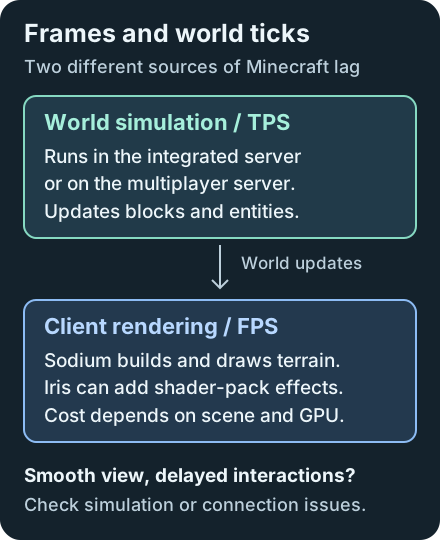
Sodium replaces Minecraft Java Edition's client rendering engine to improve frame rates and reduce stutter. The improvement depends on your scene, hardware and other mods; there is no fixed FPS multiplier. Slow server ticks or a poor connection need a separate diagnosis.
Checked scope: Minecraft 1.21.1 with Sodium 0.6.13, using its separate Fabric or NeoForge release. This version is a pinned example for existing packs, including the stable Iris pairing below. Newer Sodium branches exist; keep a pack's required dependency versions together.
Install in the Correct Launcher Instance
- Duplicate your pack or create a test instance. Check its Minecraft version and loader before changing anything. Fabric and NeoForge files are different; a Forge pack cannot use the NeoForge JAR.
- Install the matching Sodium release through your launcher's mod manager, or put the downloaded JAR in that instance's
modsfolder. Follow the official installation guide for launcher-specific steps. Fabric 0.6.13 requires Fabric Loader 0.16.0 or newer and bundles the Fabric API modules it needs; other mods may still require the full Fabric API. - Use one terrain renderer. Remove conflicting renderers such as Embeddium, Canvas or VulkanMod from the test instance, and avoid combining Sodium with OptiFine/OptiFabric. Check the pack's dependencies before removing anything it requires.
- Launch the edited instance and open Options > Video Settings. Sodium's replacement settings screen confirms it loaded. Installing it on a dedicated server will not improve players' FPS.
For an existing Forge setup, consult the Embeddium guide and that mod's exact release requirements.
Tune Settings with a Repeatable Comparison
Start from defaults with shaders disabled. Stand in the same loaded area, facing the same direction, and let chunk updates settle. Record the FPS and visible stutter before changing one setting. Keep resolution, resource packs and FPS caps consistent between comparisons; this is a diagnostic method, not a promised benchmark result.
| Setting | Practical effect in 0.6.13 |
|---|---|
| Render Distance | Lowering it reduces terrain rendering work. Try a smaller distance before changing advanced options. |
| Simulation Distance | Affects ticking in single-player; a multiplayer server controls its own simulation. Lower values can change how far away farms remain active. |
| VSync / Max Framerate | Can cap the displayed FPS. Compare using the same cap, then choose a comfortable limit for play. |
| Chunk Update Threads | More threads can load terrain faster while worsening frame times. Keep the default initially. |
| Always Defer Chunk Updates | Can improve FPS while delaying visible block updates. Judge that delay before keeping it enabled. |
The versioned settings tooltips explain these tradeoffs. Avoid turning every performance option on without checking the result.
Shaders and Resource-Pack Compatibility
Use Iris Shaders for shader packs. Fabric Iris 1.8.8 declares a Sodium 0.6.x dependency, and Sodium 0.6.13 rejects Iris versions below 1.8.7 in its release metadata. Choose compatible releases for the same Minecraft version and loader; a newer Sodium branch may require a different Iris release.
Sodium 0.6 includes Fabric Rendering API support, so Indium is unnecessary for this scope. Older Sodium 0.5 setups have different requirements. Connected textures are a separate feature: packs using that format may need Continuity.
Resource packs that replace Minecraft's internal core shaders can be incompatible with Sodium. These differ from Iris shader packs; see the maintainer's resource-pack notes.
Troubleshoot Crashes, Missing Blocks and Lag
Launch failure: read the loader's dependency message and logs/latest.log in the edited instance. Check for duplicate JARs, the wrong loader, and a mismatched Iris or Sodium addon. Reproduce with a minimal loader-plus-Sodium instance, then add mods back individually.
Flickering or missing terrain: test without resource packs and shaders. Follow the official driver compatibility guidance, including GPU-specific driver problems. The pinned release's hardware policy provides official support for graphics cards with up-to-date OpenGL 4.5-or-newer drivers. Older cards may work, but upstream does not provide support or guarantee compatibility for them.
Smooth camera but delayed mobs or block interactions: investigate world ticks or networking. Lithium addresses simulation work, while Sodium addresses rendering. Record which symptom remains before adding more performance mods.
Sodium FAQ
Is Sodium better than OptiFine?
Results depend on hardware, settings and the scene. Sodium focuses on rendering; features such as shader loading and connected textures use separate compatible mods. Compare the same scene and settings on your system.
Does Sodium work on Forge?
The checked 1.21.1 releases target Fabric and NeoForge. NeoForge is a different loader from Forge, so do not place a NeoForge JAR in a Forge instance. Check Embeddium releases for an existing Forge pack.
Does Sodium work with shaders?
Shader packs need a compatible Iris release. For the Fabric example here, Iris 1.8.8 accepts Sodium 0.6.x. Shader effects add rendering work and can reduce FPS even when Sodium is installed.
Do I need Indium with Sodium 0.6.13?
No. Sodium 0.6 includes Fabric Rendering API support. Advice for older Sodium 0.5 setups does not apply to this guide; other mods can still require Fabric API itself.