
What Lithium Optimizes
Lithium reduces the work Minecraft spends on game logic, including mob AI, entity collisions and hopper activity. It targets world simulation in single-player and on dedicated servers. Results depend on the workload; a fixed percentage improvement is not promised.
Checked scope: Lithium 0.15.4 for Minecraft 1.21.1, with separate Fabric and NeoForge releases. This is a pinned walkthrough for existing packs, not a latest-version claim.
Lithium aims to preserve normal gameplay, but does not guarantee bit-identical behavior. Its version-specific configuration documents small technical deviations in enabled optimizations. The release notes also describe fixes for inventory invalidation and comparator updates. Test important farms on a world copy.
Install Where the Simulation Runs
- Stop the game or server. Back up the world and keep a copy of the existing instance and configuration.
- Confirm Minecraft 1.21.1 and the loader. Download one matching Lithium JAR into that instance's
modsfolder. NeoForge files are not Forge files. - For single-player, edit your game instance: it runs an integrated server. For multiplayer server tick performance, install Lithium on the dedicated server.
- Start the copied world and check the startup log for the loaded Lithium version. Test ordinary play and important redstone or storage systems before changing a live server.
Players do not need Lithium simply to join a server using it. Client and server installations work independently. Installing it only on your computer cannot optimize a remote server's tick loop; see the project's sidedness explanation.
The checked Fabric manifest requires Fabric Loader 0.15.1 or newer, does not require Fabric API, and marks OptiFabric as incompatible. Other mods may still need Fabric API. Use the matching NeoForge release for a NeoForge pack and respect the loader's dependency messages.
Compare MSPT Alongside TPS and FPS
FPS measures frames drawn by the client. TPS describes simulation ticks per second; MSPT is the time spent processing a tick. At the normal 20-TPS target, the tick budget is 50 milliseconds. Lowering tick work can create spare capacity while TPS remains at 20. Sustained work above that budget causes simulation to fall behind.
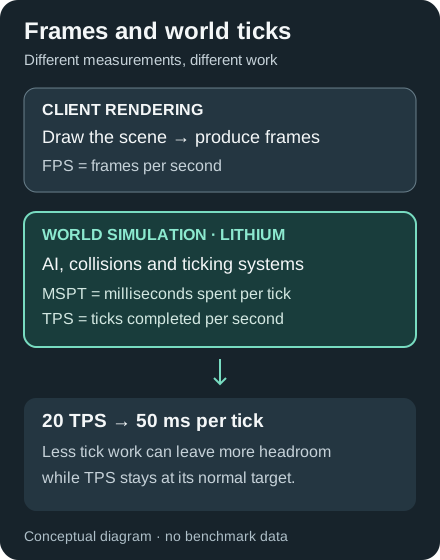
Conceptual diagram, not benchmark results.
With a compatible spark installation and command permission, /spark tps reports tick statistics; see spark's TPS and MSPT guide. Repeat the same scene on equivalent world copies with and without Lithium. Keep hardware, Java settings, simulation distance, mods and player activity consistent. Let initial loading settle and compare several runs, including spikes.
If ticks are healthy but the camera is choppy, investigate rendering with Sodium. Slow arrival of new terrain is a different workload; the C2ME guide explains chunk preparation and its experimental status.
Keep Defaults and Isolate Compatibility Problems
An empty config/lithium.properties file is normal: defaults still apply. Changes require a restart. Avoid copying an “enable everything” preset; in this release, the pathing optimization group and experimental category are disabled by default.
If a farm, hopper or other mechanic behaves differently, reproduce the problem on a backup. Compare the same situation with Lithium removed, then consult the exact release's Fabric configuration or NeoForge configuration. Disable one relevant optimization only when its documentation or a maintainer's advice supports that test; restart and retest.
For startup failures, read the full loader report for wrong-version files, duplicates and incompatible mods. Keep logs, exact versions and reproduction steps for the official issue tracker. A successful launch alone does not certify an entire modpack.
Lithium FAQ
Does Lithium increase FPS?
Its main target is simulation overhead. Single-player responsiveness can improve when ticks are the bottleneck, but a rendering-limited client needs separate investigation. Measure tick time and FPS separately.
Does everyone on a Lithium server need the mod?
No. Players can connect without Lithium. Install it on the server to optimize that server's simulation; a client-only installation does not change the remote server's tick loop.
Does Lithium always preserve vanilla mechanics exactly?
No absolute guarantee applies. The checked release aims to preserve normal gameplay, documents some small technical deviations, and includes bug fixes. Test important technical builds on a backed-up world.