
What C2ME Changes
C2ME, the Concurrent Chunk Management Engine, targets chunk generation, loading and disk I/O. It performs suitable work concurrently across CPU cores. It is worth testing when terrain preparation struggles to keep up with exploration; core count alone does not predict a speedup.
Checked release: C2ME 0.3.0+alpha.0.362+1.21.1, for Minecraft 1.21.1 and Fabric. This pinned release is alpha software. The project README warns that build tests do not establish production-server stability and recommends world backups. Begin with a copy of your world.
Install the Matching Fabric Build
For single-player, install C2ME in your game instance, where the integrated server runs. For multiplayer world-generation and loading benefits, the dedicated server needs it. Players do not all need C2ME to connect. Installing it only on a client cannot accelerate a separate server's terrain generation.
- Stop the game or server and make a verified world backup.
- Confirm Minecraft 1.21.1, then download the matching official Fabric JAR into the intended
modsfolder. - Use Fabric Loader 0.16.0 or newer and Java 21 or newer, as required by the main release manifest.
- Launch a copied world and verify the loaded version in the startup log before measuring anything.
Fabric API is not a blanket requirement for this build. If present, versions below 0.107.0 are marked incompatible; choose an API release for Minecraft 1.21.1. Optional extended-distance networking uses Fabric API, with its own requirements. Keep a pack's dependency versions together.
Separate New Terrain from Saved Chunks
New terrain needs generation; saved terrain needs reading and loading. Test those workloads separately. C2ME can reduce chunk-preparation delays without improving FPS when rendering is the limiting factor. CPU work can also wait on memory, storage or other game systems.
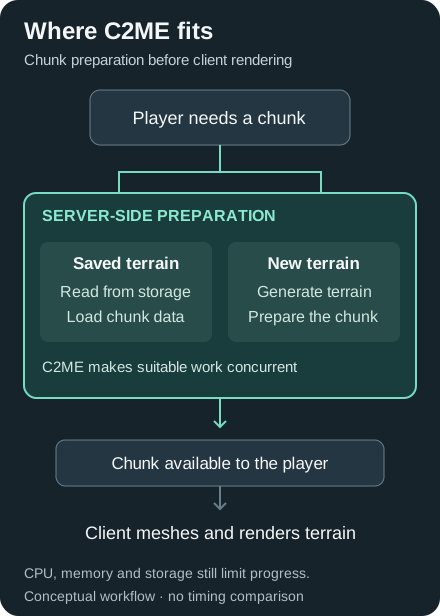
Conceptual workflow, not a timing chart or a claim that every stage runs in parallel.
Compare the same seed, route, distances, mod list and Java settings. Use equivalent world copies for new-terrain tests so the second run does not inherit already-generated chunks. Record terrain-arrival delays and server tick time alongside frame-time behavior. These are comparison instructions, not benchmark results.
For pre-generation, follow the Chunky guide and test a small area before committing to a large job. A fixed “several times faster” result is not guaranteed. Lithium addresses simulation work, while Sodium addresses client rendering.
Start with the Generated Defaults
C2ME creates config/c2me.toml. A value of "default" means the build chooses its default; it is not a missing setting. Its executor calculation considers CPU availability, maximum heap, operating system and client/server environment. Do not substitute logical-core count as a universal tuning rule.
In this build, density-function compilation and native worldgen acceleration default to disabled. The experimental chunk serializer is also disabled and carries a save-data warning.
Leave chunk-error recovery disabled. The chunk-system configuration warns that recovery can regenerate a failed chunk and lose its contents. Keep safe world-random access enforcement enabled. Change one documented setting at a time only after establishing a baseline.
Resolve Crashes Without Bypassing Safeguards
Compatibility depends on exact versions and settings. The manifest rejects combinations including OptiFabric and Tic Tacs; C2ME also disables selected optimizations for known conflicts. Do not override those protections to force a pack to start.
Read the complete dependency report. A Java 22 message about the optional native-math module can accompany another dependency problem; the maintainer's clarification recommends resolving the other dependency errors first. It does not change the main manifest's Java 21 requirement.
For crashes, missing terrain or worse performance, stop using the original world for experiments. Reproduce on a backup with defaults and a reduced mod list. Preserve the crash report, latest log, exact versions and steps for the issue tracker. Disabling random-access enforcement or enabling chunk recovery is not a generic crash fix.
C2ME FAQ
Is C2ME needed on both client and server?
No. Install it where the world runs for chunk-generation benefits: in the single-player instance or on the dedicated server. A client-only installation does not speed up a remote server's terrain generation.
Does C2ME work with every world-generation mod?
No blanket compatibility guarantee applies. Test the exact versions together on a backed-up world, retain the compatibility safeguards and investigate reproducible errors before using the combination on an important server.
Should I set C2ME worker threads to my CPU core count?
Start with the generated default. The checked build considers memory and environment as well as available CPUs; forcing a larger pool can create contention rather than improve responsiveness.