
What Chunky pre-generation does
Chunky generates terrain ahead of exploration, moving that work to a time you choose. It can reduce generation-related server lag, but it still needs CPU time and disk space. It does not promise a client FPS increase or fix every source of low TPS.
This guide covers Chunky 1.4.23 on Minecraft 1.21.1, with separate Fabric, Forge and NeoForge downloads on the official release page. Install the build matching your loader. Plugin releases have their own installation requirements.
Install your intended world-generation mods and datapacks first. Pre-generation normally skips existing chunks; adding new terrain settings afterward does not regenerate those areas.
Quick start: select a world and a small area
Make a world backup and check free disk space before a large run. Start with a small test while players are offline. The official pre-generation walkthrough explains setup and progress output.
These commands use the in-game slash; omit it in a server console. You need permission to run them.
- Run
/chunkyto check installation and see help. - In-game,
/chunky worldselects your current world. In a console, supply the world name explicitly using the available command suggestions. Names differ between mod and plugin setups; do not assume the Overworld is selected. - Choose
/chunky shape square,/chunky center 0 0and/chunky radius 500for a small test around the origin. Change the center if your base is elsewhere. - Run
/chunky selectionand verify the world, shape, center and radius. Then use/chunky start. - Check
/chunky progress. Repeat selection and generation separately for each dimension you need.
Radius is measured in blocks, from center to edge. A square radius of 5,000 spans 10,000 blocks per side: approximately (10,000 / 16)² = 390,625 chunks, before boundary rounding. Doubling radius roughly quadruples area and work. A circle covers less area than the same-radius square.
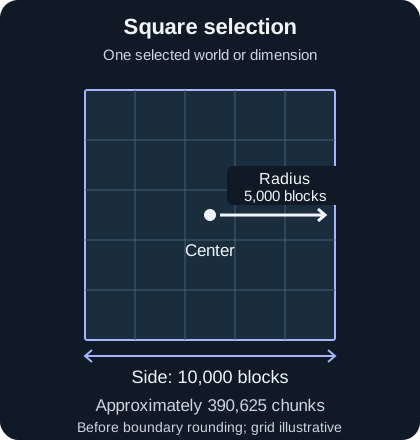
Selection geometry, not a Minecraft screenshot. A Chunky selection does not itself prevent players from exploring beyond it.
Pause, resume and troubleshoot a task
Use /chunky pause to save and pause tasks, then /chunky continue to resume them. Normal shutdown also saves task progress. However, automatic resume after restart is disabled by default: the configuration sets continue-on-restart to false. Continue the saved task manually unless you deliberately changed that setting.
/chunky cancel removes tasks and saved progress; it leaves generated chunks in the world. The command reference documents optional world arguments and the distinction between task controls.
Treat ETA as an estimate, not a completion guarantee. Generation speed depends on hardware, terrain and concurrent work. If performance suffers, pause the task and reduce competing workloads. In single-player, keep the game unpaused. For errors with C2ME, test without it before assuming acceleration is compatible. See the official FAQ.
Trimming chunks permanently deletes terrain
Warning: Chunky's trim operation permanently deletes chunks, including builds and inventories in them. Deleted data cannot be recovered without a backup. Trimming is unnecessary for normal pre-generation.
Before considering it, make and verify a complete world backup, check the exact target world and selection, and read the official trimming instructions. The default operation deletes chunks outside the selection; other options can change what is deleted. Review the confirmation carefully.
Restart the server after trimming: chunks still loaded in memory may otherwise be saved back to disk. Follow the official instructions for the full procedure, including confirmation and restart.
Chunky FAQ
Will Chunky resume automatically after a restart?
Not with the default configuration. Saved tasks can be resumed with /chunky continue; automatic resume requires deliberately enabling continue-on-restart.
How many chunks does a 5,000-block radius generate?
A square selection covers approximately 390,625 chunks before boundary rounding. Shape and alignment affect the exact count. Use task progress for the actual selection rather than assuming millions of chunks.
Does cancelling a task delete generated chunks?
No. Cancel removes task progress, while already generated terrain remains. Trimming is a separate destructive operation that requires a verified backup and careful selection.