
What is Distant Horizons?
Distant Horizons (DH) draws simplified level-of-detail terrain beyond Minecraft's normal render distance. You can see a distant mountain or a previously visited build while nearby chunks retain their normal detail. LODs are a visual representation: increasing their distance does not keep distant farms ticking.
This guide covers Minecraft Java 1.21.1 with DH 3.3.3 on Fabric or NeoForge, using the official release. Rendering, background generation and storage all have costs; choose settings against your own frame-time baseline.
Install and make a first comparison
- Back up your instance and worlds. Use Java 21 and the loader your pack already uses. The Fabric build requires Fabric Loader 0.16.9 or newer and bundles Fabric API; its matching JAR also supports NeoForge.
- Put DistantHorizons-3.3.3-1.21.1-fabric-neoforge.jar in the instance's
modsfolder. Launch without shaders for the first check. - Open the DH logo button beside the FOV slider. Confirm rendering is enabled and open an outdoor viewpoint in a test world.
- As a conservative experiment, try Minecraft's render distance at 8 chunks and LOD Chunk Render Distance Radius at 64. These are starting values, not performance guarantees. Let terrain appear before increasing the radius.
DH 3.3.3 resets its configuration during the config-version upgrade. Recheck your settings after updating from an earlier release. Sodium can accompany DH, but first establish that DH works in your chosen instance.
How terrain becomes LOD data
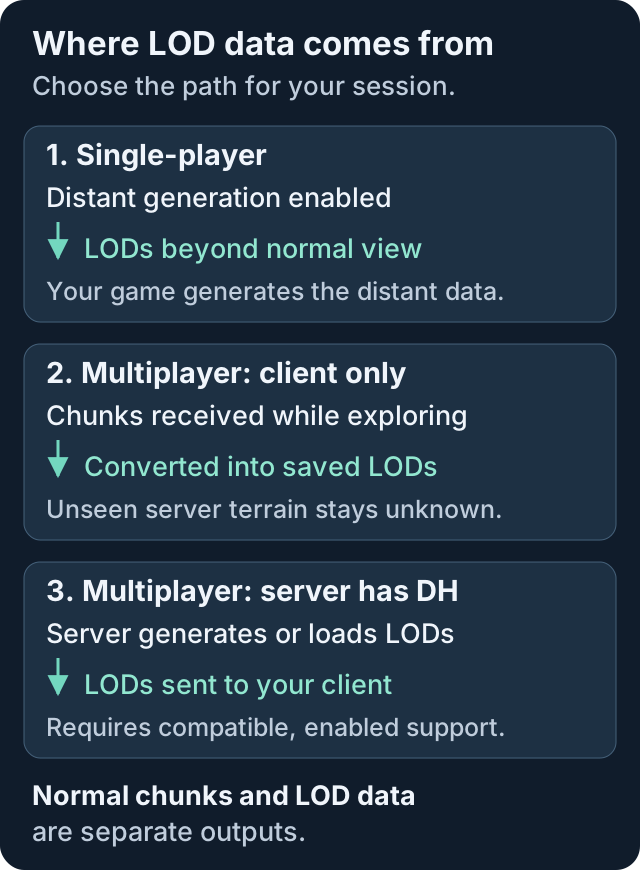
In single-player, Enable Distant Generation allows DH to produce LODs beyond the normal view distance. Generating a new horizon takes time. FEATURES mode can produce visual differences in trees or structures; FULL and INTERNAL_SERVER modes also generate normal chunks. Back up before changing generation behavior in an established world.
With DH installed only on your multiplayer client, walk or fly through the area to receive chunks. DH saves their LODs between sessions, but cannot generate unseen server terrain locally. Increasing the radius cannot fill an unexplored area by itself.
The official FAQ locates Minecraft 1.21.1's single-player Overworld database, DistantHorizons.sqlite, inside saves/WORLD_NAME/data/. Multiplayer data lives under Distant_Horizons_server_data in your instance. Other dimensions have separate databases. Allow disk space to grow with exploration. Close the world before copying databases and include any accompanying -wal and -shm files.
Server support and pre-generation
A modded server running a compatible DH build can supply LODs beyond the chunks your client receives normally. Prefer the same DH build on both sides and enable distant generation on both. Check F3 for Server has full DH support; client-only caching still works when the server lacks support.
For administrators, the server documentation documents /dh pregen start overworld 0 0 64: a 64-chunk radius around the origin. Use /dh pregen status to check progress and /dh pregen stop to stop. Schedule generation away from active play because it consumes server resources.
Chunky generates normal chunks. Its activity can trigger DH updates, but those updates can fall behind and leave LOD holes. Use DH's own pre-generation for LOD coverage. In 3.3.3, DH pauses its world generation while Chunky's generator is active.
Missing terrain, stutter and shaders
For missing LODs, check that DH rendering is enabled, disable shaders, then test a minimal instance. Separate missing data from a rendering problem: an unexplored client-only server view has no distant data to display.
If generation causes stutter, lower CPU Load or temporarily disable distant generation. For GPU or video-memory pressure, lower Quality Preset or the LOD radius. These controls address different workloads; lowering visual quality does not speed up world generation. The troubleshooting guide covers further checks.
Add Iris only after the baseline works, with a shader release that explicitly supports DH. The shader, Iris and DH versions must agree; a familiar pack name alone does not establish compatibility. Re-test with shaders disabled when diagnosing missing or corrupted terrain.
Distant Horizons FAQ
Does Distant Horizons work with shaders?
Yes, with a compatible Iris build and a shader release that explicitly implements DH support. Test DH without shaders first; unsupported shaders can prevent LODs from rendering.
Does Distant Horizons work on multiplayer servers?
Yes. Client-only installations retain LODs from chunks you receive while exploring. A server with compatible DH support can generate and send additional LODs when generation is enabled on both sides.
Does Chunky automatically fill Distant Horizons LODs?
Chunky can trigger DH updates, but the official server documentation warns that this can leave holes when DH falls behind. Use DH pre-generation for LOD coverage and treat normal chunks and LOD data as separate outputs.