What is Iris Shaders?
Iris loads shader packs that change Minecraft Java Edition's lighting and other visual effects. It works with Sodium, while the shader pack supplies the effects and settings. Iris aims to support existing OptiFine-format shader packs; compatibility and performance still depend on the chosen pack and your graphics hardware.
Checked walkthrough: Iris 1.8.8 for Fabric, Minecraft 1.21.1, paired with Sodium 0.6.13. Its release metadata declares Sodium 0.6.x. This is an explicit version pair for existing packs, not a claim that it is the newest release. Separate NeoForge builds exist, with their own release requirements; the steps and fact box here cover Fabric.
Iris is client-side. A multiplayer server does not need Iris for you to use shaders. Adding it also does not supply a shader pack automatically.
Prepare the Loader and Matching Mods
Duplicate an existing pack before changing its renderer. Check that its loader is Fabric and its Minecraft version is 1.21.1. Use the launcher's mod manager to install the matching Iris and Sodium releases, or put both JARs in that instance's mods folder. Check that the manager installed Sodium rather than assuming it is bundled in the Iris mod JAR.
For this pair, Sodium requires Fabric Loader 0.16.0 or newer. Both releases include the Fabric API modules they need; additional mods can require the full Fabric API. Follow the Sodium installation instructions for launcher setup.
Keep one renderer stack. These releases reject Embeddium, Canvas and OptiFabric; remove conflicting renderers from the test instance after checking pack dependencies. Sodium 0.6 supplies Fabric Rendering API support, so an old guide's Indium requirement does not apply.
Launch once with shaders disabled. Confirm that normal terrain renders correctly before adding visual effects.
Add and Enable a Shader Pack
Download a shader pack from its author's official page and check that its release supports Iris and your Minecraft version. Keep the pack's ZIP file; it belongs in shaderpacks, while mod JARs belong in mods.
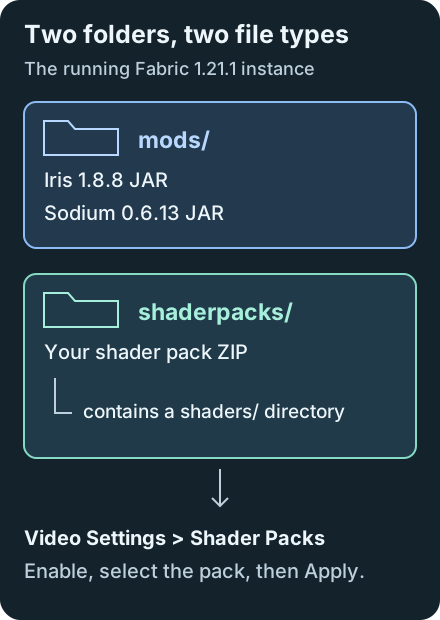
- Open Options > Video Settings > Shader Packs and choose Open Shader Pack Folder. This opens the running instance's folder and avoids editing a different launcher profile.
- Copy the shader ZIP into that folder, then refresh the pack list if needed. A valid archive contains a
shadersdirectory; a download wrapping another ZIP may need its inner shader archive copied out. - Enable shaders if the screen says Shaders: Disabled, select the pack and click Apply. Loading may take time while shaders compile.
- Open Shader Pack Settings to change options supplied by that pack, then apply the changes.
Default shortcuts are O for the pack screen, K to toggle shaders and R to reload them. Check Controls > Key Binds if another mod uses the same key. The maintainer's usage guide documents these controls; its older installation/version tables should not be used for this pair.
Find a Usable Quality Setting
Stand in the same scene and compare shaders enabled with disabled using K. Keep render distance and the FPS cap unchanged. If performance drops only with shaders enabled, start with the shader pack's lower quality preset and retest.
Reduce shadow distance when the pack exposes it; the versioned Iris tooltip explains that this limits terrain rendered in the shadow pass. Some packs fix that distance themselves. Other options, such as volumetric effects or reflections, depend on the pack, so read its documentation before adjusting them.
Lowering Minecraft's render distance can also reduce work. Sodium's optimizations do not remove the cost of shader effects, and a high FPS cap cannot make a GPU render faster. Change one option at a time so the result is attributable.
Resolve Missing Packs and Rendering Errors
Pack absent from the list: use the in-game folder button again. Put the downloaded ZIP directly in that running instance's shaderpacks folder, check that its filename ends in .zip, then reopen the Shader Packs screen. Iris 1.8.8's pack discovery lists directories and ZIP filenames before checking shader contents; appearing in the list does not prove that a pack is valid.
Pack listed but will not load: read logs/latest.log and check that the ZIP contains a shaders directory. If the download wraps another ZIP, copy the inner shader archive into shaderpacks. Download a fresh copy if the log reports a corrupt archive. Resource packs belong in resourcepacks; copying one into shaderpacks does not make it a shader pack.
Game fails before the menu: read the loader message and logs/latest.log. Check Minecraft and loader versions, duplicate JARs, and the Iris/Sodium dependency pair. Upgrading only Sodium to another branch can break this setup.
Shader fails to compile or shows broken effects: disable it, try the pack's default settings and test another release the author supports. Reproduce with just the required loader and renderer mods, without extra resource packs. Record the Iris/Sodium versions, GPU driver and log when reporting the problem.
Check the official driver guidance for GPU issues. When also using Distant Horizons, verify compatibility across its version, Iris and the shader pack; ordinary Iris support alone does not establish LOD support.
Iris Shaders FAQ
Which shader packs work with Iris?
Use a pack whose author lists Iris support for its release. Iris aims to support OptiFine-format shader packs, but a pack can depend on features unavailable in a particular Iris version.
Does the Iris mod JAR include Sodium and a shader pack?
The Fabric Iris 1.8.8 mod JAR requires a separate Sodium 0.6.x installation. A launcher may resolve that dependency automatically. Download a compatible shader pack separately and put its ZIP in the running instance's shaderpacks folder.
Why are my shaders slow?
Compare the same scene with shaders disabled. If enabling the pack causes the slowdown, try a lower preset and reduce exposed shadow settings or render distance. Results depend on the pack and GPU; there is no universal FPS target.
Can I use this Fabric Iris JAR in a Forge or NeoForge pack?
No. Loader files are not interchangeable. NeoForge has separate Iris releases with their own requirements. A Forge pack needs a shader solution explicitly built for its Minecraft and Forge versions.