What Embeddium changes on Forge 1.20.1
Embeddium replaces Minecraft's client rendering engine with a Sodium-derived implementation adapted for mod compatibility. It can improve how smoothly your view renders; installing it on a dedicated server provides no performance benefit.
This guide covers Embeddium 0.3.31 on Minecraft 1.20.1 with Forge. The official release also lists NeoForge, but files for other Minecraft versions have different loader requirements. Match the individual download to your instance.
Use Sodium as a starting point for Fabric or newer NeoForge packs, checking its supported releases. Never assume that a renderer's whole Minecraft version range applies to every listed loader.
Install Embeddium and check the first launch
Work in a duplicate launcher instance when changing an established pack. Keep its existing Minecraft, Forge and Java configuration so you can isolate renderer changes.
- Launch the Forge 1.20.1 instance once and close Minecraft.
- Put Embeddium 0.3.31+mc1.20.1 in that instance's
modsfolder. A launcher mod manager can select the matching file. This release lists no required companion mod. - Remove the separate Rubidium jar and TexTrue's Embeddium Options if present: the release metadata marks both incompatible. Embeddium already includes its own options screen.
- Relaunch and check that Embeddium appears in the Mods list. Open Options → Video Settings, then load a test world with the default settings.
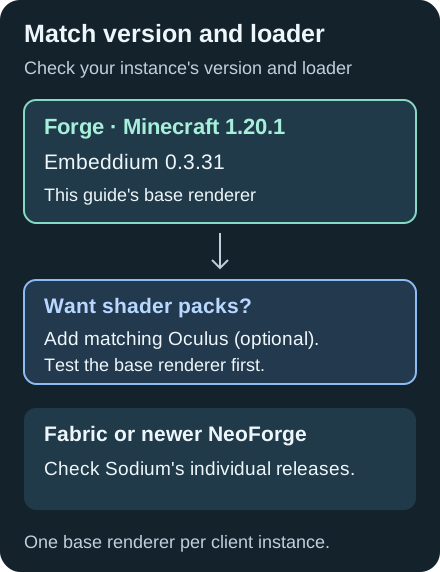
Original setup diagram; follow each mod's individual release requirements.
Shaders are optional. For Forge 1.20.1, Oculus supplies shader-pack support; Oculus 1.8.0 lists Embeddium as required. First check the base renderer without shaders, then add Oculus and test your chosen pack.
Tune settings with a repeatable comparison
Stand in the same place, face the same direction and let chunks finish loading before comparing settings. For example, compare your base at 12 and 8 chunks of render distance while keeping the window size and shader state unchanged. Record the FPS and how camera movement feels; there is no guaranteed percentage gain.
The 1.20.1 settings source explains these controls:
| Setting | Practical starting point |
|---|---|
| Chunk Update Threads | Keep Default initially. More threads may build chunks faster but worsen frame times. |
| Always Defer Chunk Updates | Enabled by default. Rendering can continue while chunk updates finish; try disabling it if block changes appear visually late. |
| Translucent Face Sorting | Enabled by default in this release. It corrects overlapping translucent surfaces such as stained glass and water. |
Change one option at a time, apply it and repeat the same short walk. Restore the previous value if it does not help. A smooth camera with delayed interactions can indicate simulation or connection trouble that client rendering changes will not resolve.
Fix crashes, missing faces and broken animations
For a launch failure after updating, recheck the Minecraft version and remove obsolete options add-ons. The official changelog documents the built-in options screen replacing TexTrue's add-on from 0.3.16 on 1.20+.
If blocks have holes with a resource pack, test Use Block Face Culling disabled. For textures that stop animating, test Animate Only Visible Textures disabled. These are targeted checks from the option tooltips; keep other settings unchanged and compare with the default resource pack.
For disappearing chunks or a shader-only failure, reproduce in a copied test instance with Embeddium alone before restoring rendering add-ons individually. Consult the compatibility wiki, checking each note's Minecraft and mod version. Historical incompatibilities do not establish that every later version is broken.
Report a reproducible Embeddium problem to its own issue tracker, including the exact mod versions, reproduction steps and client log or crash report. Embeddium's maintainers request that its bugs are reported there rather than to CaffeineMC.
Embeddium FAQ
Does Embeddium need Rubidium or an options add-on?
No. For 0.3.31 on Forge 1.20.1, remove the separate Rubidium and TexTrue's Embeddium Options jars. Embeddium provides the renderer and its options screen.
Does Embeddium include shaders?
It does not load shader packs by itself. Forge 1.20.1 players can add a compatible Oculus release after verifying the base installation.
Should I install Embeddium on the server?
No server installation is needed for its rendering benefits. Install it in the Minecraft client instance you actually launch.