
JEI version and installation
Just Enough Items (JEI), by mezz, adds a searchable ingredient list beside your inventory and recipe pages for supported crafting processes. Use it to work backwards from a machine you want to build, checking each ingredient before gathering materials.
This guide covers Minecraft 1.21.1 with NeoForge and JEI 19.51.0.418. The official release requires NeoForge 21.1.238 or newer on the 1.21.1 line and Java 21. Put its NeoForge JAR in the instance's mods folder; this build requires no separate library mod. In an established modpack, keep the pack's supplied versions unless its maintainer specifies an update.
On 1.21.1, client-only browsing is supported, with limitations. Install matching JEI on the server for its standard recipe-transfer support. Recipes changed by a pack or server also need to be checked in that actual environment.
Recipes, uses, and bookmarks
Open your inventory and search for an item. With the pointer over it, press R to see ways to make it, or U to see recipes that consume it. In the ingredient list, left-click opens recipes and right-click opens uses while cheat mode is off.
Follow a missing component by hovering it inside a recipe and pressing R again. Backspace returns to the previous recipe view. Press A over an ingredient to add or remove a bookmark, keeping a shopping list beside the inventory. The default key mappings can be changed in Minecraft's Controls menu.
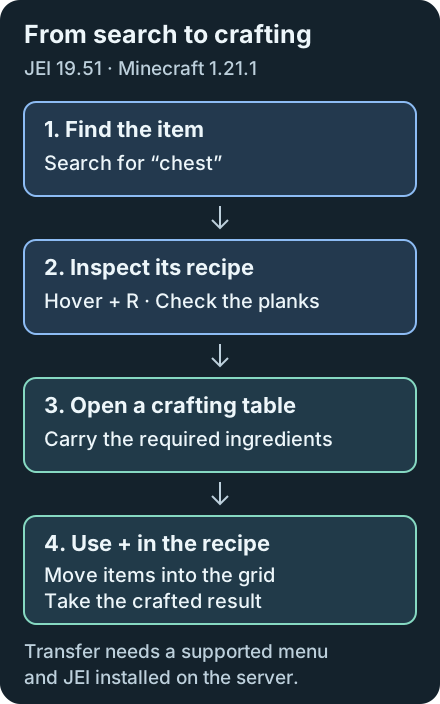
For a first exercise, find a chest recipe, inspect its plank ingredient, then return to the chest. In a pack containing Mekanism, use the same approach to trace a machine's components.
Search syntax for JEI 19.51
Ctrl+F focuses the search bar; right-clicking it clears the query. Combine terms to narrow results, such as @minecraft pickaxe -wooden. Put quotation marks around a phrase containing spaces.
| Search | Meaning in this release |
|---|---|
@mekanism | Items from Mekanism, when installed |
#minecraft:planks | Items carrying the planks tag |
$word | Match a word in tooltip text |
&minecraft:chest | Match the identifier after enabling identifier search |
These prefixes follow the 19.51 search implementation: # searches tags; $ searches tooltips. Older instructions may reverse them. Identifier search is disabled by default in this build. If a prefix fails, inspect JEI's Search settings and confirm your installed version before changing the query.
Using the plus button
For the chest exercise, carry the required planks and open a crafting table. Find the chest recipe again and click + to arrange the ingredients in its grid. Take the result from the crafting output. Shift-click + requests multiple sets, subject to available ingredients and slot capacity.
Transfer needs a compatible open container and a registered transfer handler. A machine recipe being visible does not guarantee that its menu supports automatic transfer. Hover a disabled button for its explanation: missing ingredients, insufficient inventory room, and absent server-side JEI are distinct failures in the transfer handler.
For a recipe needing a 3×3 grid, open a crafting table before looking it up. The player's 2×2 grid cannot accommodate it. If transfer reports missing items, check the accepted ingredients and move supplies into your inventory.
Missing overlays and cheat permissions
If the item list disappears, try Ctrl+O with an inventory open. Clear the search, then reduce GUI Scale if there is too little room beside the inventory. Check Controls for conflicts; Controlling helps inspect crowded keybinding lists. On macOS, JEI uses Command for the Control-or-Command shortcuts.
Ctrl-click the configuration button toggles cheat mode. It changes ingredient clicks into item-giving actions when permitted. Keep it off for normal recipe browsing. With JEI installed server-side, the default rules allow operators and Creative-mode players; permission through the give command is a separate, disabled-by-default option. The server checks permission, so the client toggle cannot grant access.
If the object you need is already placed in the world, Jade can help identify it before you search JEI.
Just Enough Items (JEI) FAQ
Does JEI need to be installed on the server?
For Minecraft 1.21.1, client-only browsing works with limitations. Standard plus-button recipe transfer needs JEI on the server. This guidance does not cover later Minecraft versions.
Why does the JEI plus button not work?
Open the correct crafting table or supported machine menu, carry the required ingredients, and leave inventory room. Hover the button for an error; standard transfer also requires server-side JEI.
Why does JEI tag search differ from older tutorials?
In JEI 19.51.0.418, # searches tags and $ searches tooltips. Check the installed version and its Search settings, since older documentation can describe different prefixes.